A website that tells new patients what to expect
A new patient wants to know whether you take their insurance, what it costs without it, and what the first visit is like. Say it plainly, and keep their health details off the website.
The plain plan, no add-ons: $8 a month billed yearly ($12 month to month).
See it working
Each example is a made-up business on a real SiteBrite site. Open it, click through its pages on your phone, then try its editor.
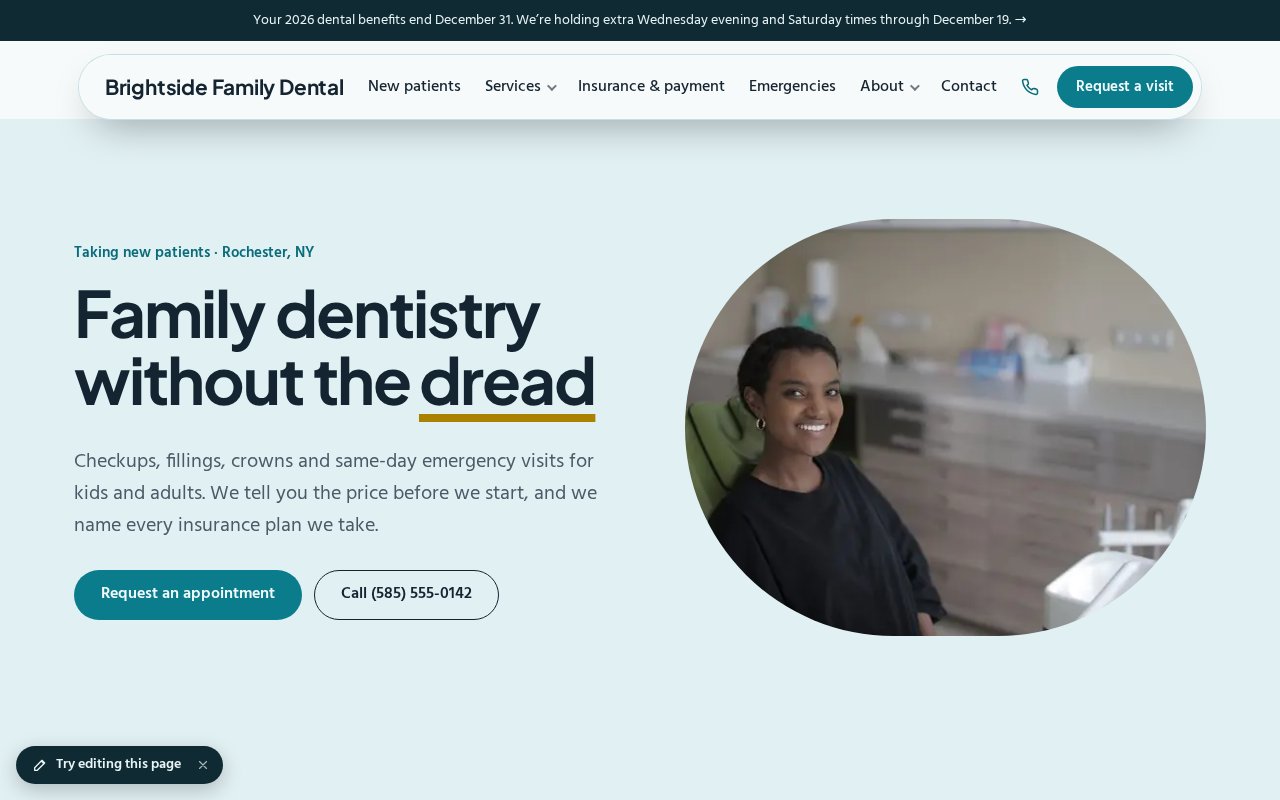
How a dental practice uses it
Start with the plan alone and add what you need when you need it. Nothing here is a separate login.
Put the phone, the hours and the emergency number first
In the planA call bar keeps your number one tap away, and the hours include the Wednesday evening and Saturday morning that working families look for. A separate emergency page says who to call after hours and what happens next.
Name every insurance plan you take
In the planList the plans by name and answer Medicaid and Medicare with a plain yes or no. “We take most insurance” sends people to a competitor who says which.
Show what it costs without insurance
In the planA price list for the exam, X-rays, a cleaning and an emergency visit, and a membership plan for people with no coverage, with how to cancel. Treatments that vary say “written estimate” and when you give one.
Take appointment requests, not health details
In the planA form asks who the visit is for, new or existing, and which days and times work, with a plain note not to send medical details. Requests land in your inbox with a reminder to follow up, and you reply from there.
Walk a first-timer through the visit
In the planWhat to bring, how long it takes, what the new-patient exam includes and what it costs. A page for children and nervous patients says what you do to make it easier.
Introduce the dentists
In the planA page for each dentist and hygienist with a photo, school and training, and a few words about how they work. A face and a credential are what a new patient looks for before they call.
Keep the legal and accessibility pages honest
In the planA privacy page that summarizes how you handle patient information, accessibility basics, and a description on every photo. Say only what’s true; a claim you can’t back up is worse than none.
Post what’s coming up
In the planThe year-end benefits reminder, a Saturday with extra hours, a school visit. Events and news show on the site, and the announcement bar carries the one that matters this week.
What it adds up to
The plain plan, with no add-ons, costs $8 a month billed yearly, or $12 month to month.
$8/mobilled yearly · $12 month to month
- Website plan$8
Pictures, icons and tools in your colors
SiteBrite Studio is a free library of illustrations, icons and avatars that take on your brand colors, plus tools for signs, QR codes and more. They’re the same pictures your site uses, so a flyer or an Instagram post matches it.



What owners ask
See yours before you pay
We convert your current site for free, or build one from a few questions if you don’t have one.